


If you’re trying to decide between Claude Code Security vs GitHub Copilot for Secure Coding, the right answer depends less on “which model is smarter” and more on where security work happens in your workflow.
Some teams want a terminal-first security agent that can reason across a repo, run commands, and help you chase down logic flaws. Others want security that’s tightly embedded into GitHub PRs, issues, and policies, so fixes are tracked, reviewed, and merged with governance.
This guide compares both options in a practical way: what each tool is best at, what to watch out for, and how to choose (or combine) them without creating new security risks.
If you’re new to this ecosystem and want a full breakdown of how it works, start with our complete guide to Claude Code Security: Features, Fixes & Impact, where we explain architecture, workflows, and security implications in detail.
What “Secure Coding” Actually Means in 2026 (Not Just Finding CVEs)
Secure coding today is less about “catching obvious SQL injection” and more about reducing the real-world classes of failures that slip through:
- Authorization flaws (BOLA/IDOR, broken access control, tenant isolation bugs)
- Business logic abuse (state machine issues, payment/refund logic, bypassing checks)
- Secrets exposure (API keys in logs, config leaks, CI artifacts)
- Supply-chain risk (dependency drift, malicious packages, weak pinning)
- Unsafe defaults (debug endpoints, overly permissive CORS, insecure cookie flags)
Traditional scanners still matter. But AI tools are now competing on whether they can spot risky logic and workflow weaknesses before production does.
Claude Code Security vs GitHub Copilot for Secure Coding: Quick Comparison
Here’s the simplest framing:
Claude Code Security
Best when you want:
- A terminal-native agent that can inspect and reason across the repo
- Help with deep analysis, multi-file fixes, and “explain why this is risky”
- A workflow that feels like: an AppSec teammate inside your dev environment
GitHub Copilot (Secure Coding)
Best when you want:
- Security inside GitHub PRs, issues, and org policies
- “Fix suggestions” and automation tied to code scanning + pull requests
- A workflow that feels like: security is enforced where code ships
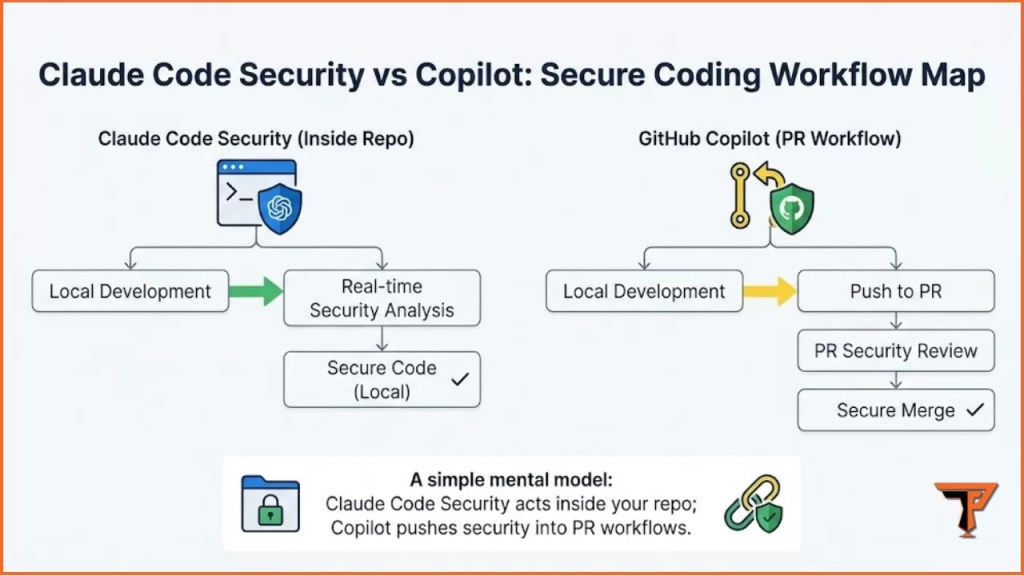
If your team’s reality is “everything must happen inside GitHub,” Copilot aligns naturally. If your reality is “we debug and refactor in terminals all day,” Claude Code Security fits cleanly.
Feature-by-Feature: What Each Tool Does Better
Repo Understanding and Context
Claude Code Security
- Strong when you need the agent to read across multiple files and explain flows
- Useful for “walk me through auth checks” and “where could privilege escalate?”
We’ve also published a hands-on evaluation in our Claude Code Security Review (2026), where we tested real scenarios, edge cases, and practical limits.
GitHub Copilot
- Strong inside the GitHub ecosystem where context is issues + PRs + diffs
- Best when your security process is PR-centered, not terminal-centered
Practical takeaway: if the vulnerability is hidden in how components interact, Claude-style analysis often feels more natural. If the problem is “fix this PR safely and consistently,” Copilot shines.
Vulnerability Discovery vs Vulnerability Fixing
Claude Code Security tends to be stronger at:
- “What could go wrong here?” style reviews
- Finding risky assumptions and missing checks
- Explaining attack paths in plain language
Copilot tends to be stronger at:
- “Fix what’s already flagged” workflows
- Autofix-style improvements aligned to GitHub checks
- Suggesting safer patterns while you code
Practical takeaway: Claude is often better at discovery and reasoning. Copilot is often better at operationalizing fixes in a team workflow.
Governance and Control
If you’re running a real team, “secure coding” is also governance:
- Who can run scans?
- Who approves changes?
- Where are audit logs?
- How do we prevent silent risky edits?
GitHub Copilot naturally fits governance because the unit of work is a PR.
Claude Code Security can fit governance too, but you must enforce it with process: PR-only merges, required reviews, and repo rules.
Best Use Cases for Claude Code Security
1) Deep security reviews on complex modules
When the risk is in “logic over time,” Claude-style analysis helps:
- Permissions checks spread across middleware + handlers
- Feature flags changing behavior
- Role-based logic with hidden fallbacks
2) “Explain the security posture of this repo”
A surprisingly high-value task is documentation:
- Identify trust boundaries
- Highlight dangerous entry points
- Explain why certain code is sensitive
3) Multi-file remediation and refactors
If you need consistent changes across the codebase (e.g., adding centralized authorization checks), a terminal agent can help coordinate.
Want to try Claude Code Security yourself? Follow our step‑by‑step How to Use Claude Code Security for Vulnerability Scanning tutorial to run /security-review and validate results.
Best Use Cases for GitHub Copilot for Secure Coding
1) PR-first organizations
If your security maturity is built on PR gates, code owners, and required checks, Copilot integrates into the exact place where security decisions are made.
2) Secure coding “as you type”
Copilot is helpful when the goal is reducing insecure code earlier:
- safer patterns for input handling
- consistent error handling
- basic sanitization, escaping, and guardrails
3) Autofix / scanning workflows
When you already run code scanning (SAST/SCA/CodeQL-like approaches), Copilot-style assistance is valuable because it accelerates the fixing loop, not just the detection step.
Side-by-Side Comparison Table
| Category | Claude Code Security | GitHub Copilot (Secure Coding) |
|---|---|---|
| Best workflow fit | Terminal-first developers | GitHub-first teams |
| Strength | Reasoning across code + logic | PR governance + fix acceleration |
| Best at | “Find the flaw” + explain | “Fix the flagged issue” |
| Team rollout | Requires process discipline | Fits org controls naturally |
| Risk to manage | Local execution, scope control | Over-trusting suggestions |
| Ideal use | Deep review + refactors | PR automation + standardized fixes |
The Reality: Most Teams Should Use Both (Deliberately)
A strong setup is rarely “one tool only.” The practical modern pattern looks like this:
- Copilot for day-to-day coding assistance + PR workflow
- Claude Code Security for deep dives, complex refactors, and security investigations
The key is avoiding chaos. You need rules:
- PR-only merges
- Required human review
- Code owner approvals for security-sensitive areas
- A simple checklist for AI-generated security changes
Step-by-Step: A Safe Workflow to Compare Them on Your Codebase
This is the fastest way to evaluate Claude Code Security vs GitHub Copilot for Secure Coding without getting lost in demos.
Step 1: Pick one “high-risk” area of the repo
Choose something like:
- auth + session handling
- payment / credits / subscriptions
- file upload / parsing
- admin APIs / internal endpoints
Step 2: Run a baseline “manual + scanner” pass
Even if you’re AI-first, do a baseline:
- search for role checks and access control
- locate “dangerous sinks” (DB queries, template rendering, command execution)
- review recent incident-prone modules
Step 3: Ask Claude Code Security for a threat-focused review
Prompt idea (safe + practical):
- “Map auth and authorization flow. Identify endpoints that could be accessed without correct ownership checks. Give 5 high-risk hypotheses and where to verify.”
Step 4: Use Copilot in a PR-centered fix loop
Create a branch, open a PR, and use Copilot assistance to:
- apply consistent guard checks
- reduce unsafe patterns
- improve error handling
- add missing validation
Step 5: Validate with tests and one manual abuse case
Do not stop at “AI says it’s fixed.”
- add or update unit tests
- add a regression test if possible
- replay a “wrong user / wrong role” scenario
If you want a complete hands-on walkthrough, follow our detailed tutorial on How to Use Claude Code Security for Vulnerability Scanning (Step-by-Step), where we demonstrate a real scan, analysis prompts, and remediation workflow.
Quick recap:
Claude Code Security is strongest when you need repo-wide reasoning and deep logic review. GitHub Copilot is strongest when secure coding must live inside PR workflows with governance and repeatable fixes.
Security Risks and “Gotchas” With Both Tools
Don’t treat AI output as security truth
AI can sound confident and still be wrong. Treat it like a fast junior engineer:
- helpful
- fast
- needs review
Avoid leaking secrets into prompts
Security work often touches config files. Keep guardrails:
- never paste production secrets
- scrub logs
- use least-privileged access
Watch for “partial fixes”
A common failure is fixing one endpoint but missing the equivalent path elsewhere. Prefer refactors that centralize checks rather than duplicating them.
AI tools should always complement—not replace—fundamental secure coding discipline. If you need a refresher, review our Cybersecurity Best Practices Guide for baseline controls every team should implement.
Which One Should You Choose?
Claude Code Security if…
- your team works terminal-first
- you do deep refactors often
- you care about reasoning and explanation of logic flaws
- you want a security agent that can “walk the repo”
Choose GitHub Copilot if…
- your org is GitHub-governed (PR gates, issues, policies)
- you want security standardized at scale
- you want secure coding integrated into day-to-day PR workflows
Choose both if…
- you want PR governance and deep vulnerability reasoning
- you need a workflow that catches more than obvious patterns
- you’re building an authority-level secure coding pipeline
FAQs
Is Claude Code Security better than Copilot for secure coding?
For deep code reasoning and logic review, Claude Code Security often feels stronger. For PR governance and standardized fix workflows, Copilot is usually the cleaner fit.
Can Copilot replace security scanning tools?
No. It can speed up secure coding and fixing, but you still need scanning, tests, and review. Treat Copilot as an accelerator, not a source of truth.
What’s the safest way to use AI for vulnerability scanning?
Use AI for hypotheses and guidance, then confirm with:
- tests
- code review
- one manual abuse scenario
- your existing scanning pipeline
Should a team standardize on one tool?
Most high-performing teams standardize on a baseline tool (PR workflow) and allow a “power tool” for deep work. The key is to have clear rules for when each tool is used.

Conclusion
The real question isn’t “which is smarter,” it’s where you want security to live.
If your organization lives in GitHub PR workflows and needs repeatable governance, Copilot is the natural secure-coding baseline. If your work involves deep, messy code reasoning and you want a terminal-native security agent that can help uncover logic flaws and coordinate fixes, Claude Code Security is a strong fit.
For most serious teams, the winning strategy is using both on purpose: Copilot to operationalize security at scale, and Claude Code Security to go deep where scanners and checklists fall short.
Experience Note
In practice, the highest ROI comes from running AI on the same “high-risk modules” repeatedly (auth, payments, uploads) and building reusable checklists and tests around what it finds.
Disclaimer
This article is for educational secure coding and defensive security workflows. Always test only on systems you own or have explicit permission to assess, and validate AI-generated findings through human review and testing.